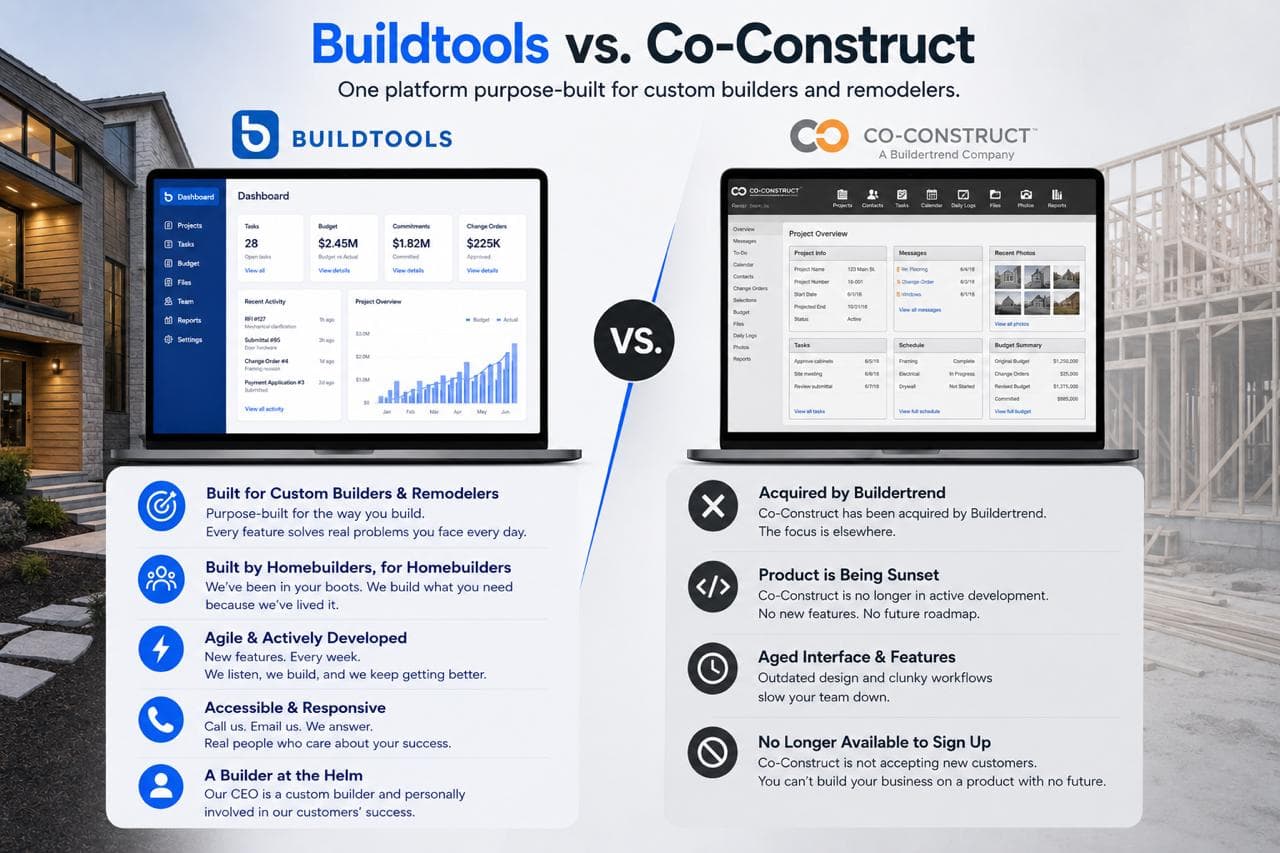
If you're a CoConstruct customer reading this, you already know what's happening.
Buildertrend acquired CoConstruct in February 2021. At the time, both companies told customers CoConstruct would continue as a standalone product. For about four years that was technically true — the platform still functioned, you could still log in, you could still manage projects. But the platform hasn't been meaningfully updated since 2021, and it's now being sunset in favor of Buildertrend. CoConstruct's own site is openly walking customers through "when to migrate."
So the real question isn't whether to move. The decision has been made for you.
The real question is where.
The default migration path, the one being promoted by the people who own both platforms, is straight to Buildertrend.
Default isn't the same as best.
What CoConstruct customers are actually experiencing right now
Before we talk about where to go, it's worth saying out loud what's already happened — because most of the marketing copy in this category dances around it.
Development stopped years ago. Multiple Capterra reviewers have flagged it: CoConstruct is no longer receiving meaningful updates. The product you're using today is essentially the product from 2021, while AI has rewritten what construction software can do.
Support got gutted. Contractors describe the post-acquisition support team as a skeleton crew working East Coast hours. If you're a West Coast builder hitting a problem during a Friday afternoon client walk-through, good luck.
Prices went up — way up. Contractors have reported monthly costs increasing by as much as 500% during the transition period. Quote from one review: "The price increase doesn't support the subpar platform and lack of technical support hours available."
The destination isn't getting cheaper either. Buildertrend's pricing has climbed steadily since the acquisition — entry-level around $99–$199/month in 2018–2019, then $299–$399 by 2020–2021, with multiple contractors reporting 50–65% increases in 2022 after the acquisition closed. Current pricing sits at roughly $4,788/year to $1,099/month depending on tier. If you signed up for Buildertrend five years ago at $199/month, you could easily be paying 3–5x that amount today for the same core features.
Support didn't recover at the destination. Multiple Buildertrend reviewers note that support quality has declined since the CoConstruct acquisition — longer wait times, less personalized help, more canned responses.
This is the trajectory you're being migrated into. Before you sign the next annual contract, it's worth asking whether that's actually where you want to be.
Migration is a strategic moment — don't waste it
Buildertrend is actively pushing CoConstruct customers to migrate to Buildertrend. Their own site walks you through "when to migrate." Their sales team is reaching out. The runway on CoConstruct is getting shorter, and the pressure is real.
Here's the thing about that pressure: it's coming from the company that owns both platforms. The migration path being promoted to you isn't necessarily the best path for your business — it's the most convenient path for theirs.
You're being forced to migrate. That doesn't mean you have to migrate to Buildertrend.
In fact, this is exactly the moment to look at every option on the market. You're going to do the work of switching either way — exporting data, reconfiguring workflows, retraining the team, rebuilding client portals, migrating active jobs. That work isn't trivial. The question is whether you do it once, into a platform built for where construction software is going, or whether you do it now to land on Buildertrend and again in three years when you realize you migrated into the same legacy architecture you were trying to leave.
Treat this as a strategic reset, not a clerical task. Now is the time to evaluate the best platform for your business — not the path of least resistance.
Ask:
- What did CoConstruct actually do well, and how do we preserve it?
- Where did the old workflow create friction we just learned to live with?
- What does our team need now that it didn't need five years ago?
- How should AI, mobile, APIs, and QuickBooks integration shape the next decision?
- Is the vendor pushing us toward the right answer, or the convenient answer?
If you only ask "what's the closest replacement?", you'll inherit yesterday's limitations. If you ask the strategic questions, you can move into a platform built for the next decade.
What CoConstruct got right — and what BuildTools carries forward
CoConstruct earned its loyal following because it understood that custom residential construction is not generic project management.
Custom builders need owner decisions tracked clearly. They need selections tied to allowances. They need change orders handled cleanly. They need schedules, communication, and financials that work together. They need clients to feel informed without being exposed to the messy machinery of the job.
Those are still the right problems.
BuildTools carries that thesis forward — and rebuilds it on a modern stack with AI as the foundation. Same DNA, current architecture.
Why BuildTools is the stronger CoConstruct alternative
BuildTools is built around the workflows CoConstruct customers care about most:
- Budgets that stay connected to actual project activity
- Change orders that don't disappear in email threads
- Selections tied to allowances and approvals
- Client communication that creates clarity instead of noise
- Documents and photos attached to the job record
- Draws, invoices, and lien waivers connected to financial reality
- Project managers and supers working from one source of truth
- QuickBooks remaining the accounting backbone, not a project management workaround
- A configurable client portal — shaped to how your company runs the homeowner relationship
The difference is that BuildTools is being built as a modern platform from the ground up — not a 2015 codebase with cosmetic updates.
The AI layer is where the real distinction lives
Buildertrend has been adding AI features. So has every other platform in this category. The pattern is consistent: AI bolted onto a legacy platform, often gated behind premium pricing tiers.
BuildTools is the opposite. The platform was rebuilt from scratch with AI embedded throughout — not as a feature, as the foundation. Built by people who run custom homebuilding companies, on a modern, open stack.
What that means in practice:
Virtual Project Management. Talk to BuildTools the way you'd talk to a project coordinator. "Create a punch item on the Gillis project for the painter to touch up the trim in the master bedroom. Assign it to Mike. Due Friday." Done.
AI Walkthrough Assistant. Walk a job, talk through what you see, and BuildTools captures notes, generates tasks, builds the punch list, and assembles a client-ready report — from the audio. The thing every super already does on a phone, structured and saved.
AI Invoice Processing. Vendor invoices come in, BuildTools reads them, matches them against POs and budgets, flags discrepancies, routes them for approval, and pushes the approved ones into QuickBooks. The hours your bookkeeper spends matching POs disappear.
AI Bid Review. Drop in three subcontractor bids and BuildTools verifies they actually match the specs and selections, highlights scope gaps, and shows you which bid is genuinely apples-to-apples.
BuildTools Intelligence. AI-assisted budgets, specifications, and schedules trained on how custom builders actually work — not generic LLM output.
This isn't roadmap. It's the platform.
Built by homebuilders — and that means something specific here
"Built by builders, for builders" gets used loosely in this category. CoConstruct earned the right to say it. So did BuildTools.
BuildTools was originally founded by Sven Gustafson, a fourth-generation custom homebuilder running Stonewood (founded 1947). He built BuildTools the first time because the software his company needed didn't exist. He sold it to ECI Software Solutions in 2020. Five years later — after watching the platform sit largely static under enterprise ownership while AI rewrote what software could do — he bought it back.
The rebuild is being driven from inside an active custom homebuilding company. Same kind of energy that made CoConstruct great in the first place. Different decade.
That changes the product instinct. Builder-led platforms ask different questions:
- Will the super actually use this on a phone with one hand?
- Does this help accounting, or create another cleanup job at month-end?
- Does the project manager see the truth quickly, without a dashboard tour?
- Does this protect margin before the damage shows up in QuickBooks?
- Does the client get clarity without being exposed to internal chaos?
Those questions drive what gets built and what doesn't.
Migration should protect what matters
The biggest risk in any migration isn't losing software functionality. It's disrupting the habits that keep jobs moving.
A good migration protects:
- Client confidence
- Project manager workflow
- Accounting handoff
- Historical project data
- Active selections and decisions
- Field adoption
- Reporting continuity
BuildTools treats migration as an operating decision, not just a vendor transition — because the people building it have managed the same workflow disruption inside their own construction company.
CoConstruct vs. BuildTools: the verdict
CoConstruct helped define what custom builders expected from software.
The platform that earned that loyalty isn't being developed anymore. The migration path being promoted to you is into the same enterprise that quietly let it stagnate while raising prices on the customers who stayed.
Your next decision shouldn't be nostalgic. It shouldn't be the path of least resistance either.
If you have to migrate anyway, migrate to the platform that's actually being built for the next decade — not the one consolidating the last one.
If you're searching for a CoConstruct alternative, BuildTools isn't a replacement.
It's the upgrade path.